
How can you streamline your BNG mapping workflow in QGIS and eliminate the usual friction?
Introduction
Ecologists delivering Biodiversity Net Gain (BNG) assessments are under increasing pressure to produce accurate spatial data; quickly. Yet for many, the reality is still hours spent fixing geometry errors, reformatting field data, and navigating clunky templates that don’t reflect how ecological surveys actually work.
Spatialsesh BNG has been developed to change that.
This is a fully developed, end-to-end QGIS project designed not just for baseline surveys, but for complete BNG assessments. It streamlines the entire workflow; from field data collection through to integrating design revisions and exporting to the metric; saving significant time while improving data quality and consistency.
What makes a good BNG mapping workflow in QGIS?
At its core, Spatialsesh BNG reflects a key shift in ecological practice. BNG assessments are no longer just about producing a habitat map; they require structured, analysis-ready datasets that integrate seamlessly with the statutory metric.
To support this, the project has been designed as a complete working environment within QGIS. It allows ecologists to manage baseline and proposed habitats, condition assessments, and spatial analysis in one place; without relying on fragmented tools or repeated data handling.
If you’re looking to build confidence with BNG workflows, see our QGIS for BNG training course which covers the core skills in detail.
How do you integrate pre-survey data into a BNG workflow?
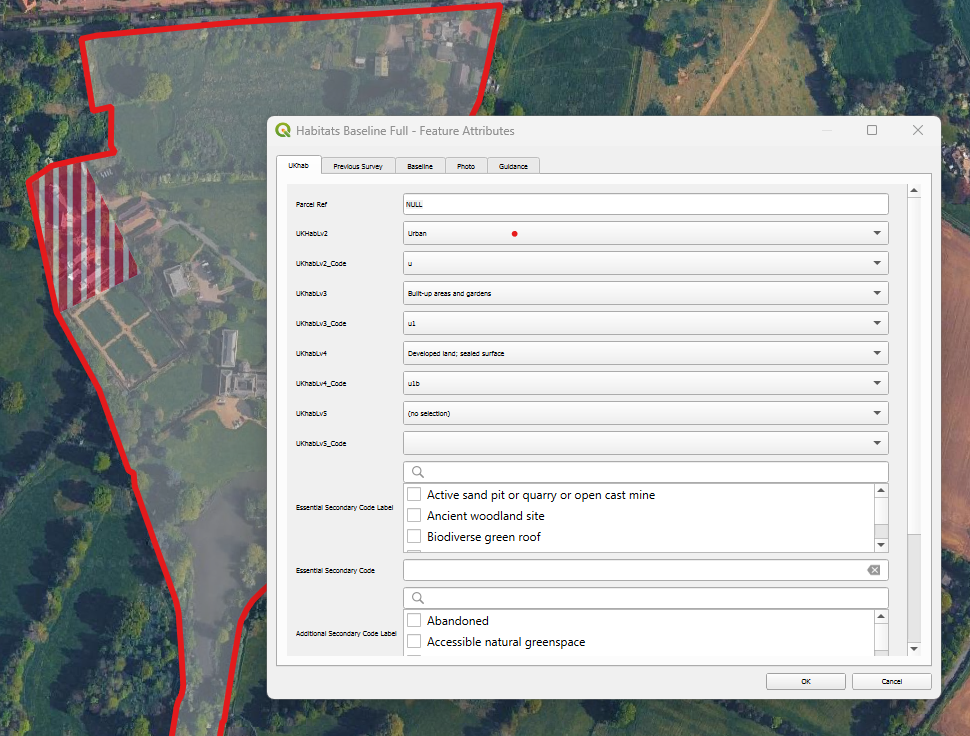
Habitat survey form with full UKhab classification
Every site is different, and good ecological assessment depends on making the most of available data.
Spatialsesh BNG allows seamless integration of a wide range of pre-survey datasets, including OS Enhanced Land Cover (ELC) or National Geographic Database (NGD), AI-generated habitat layers, Bluesky aerials or tree data, and more. These can be added, styled, and used to inform Baseline mapping without disrupting the core workflow.
This flexibility allows ecologists to tailor each project to the site, rather than being constrained by rigid templates; and to reference this information directly when refining or reclassifying baseline habitats in the field.
How can you connect field survey and GIS analysis in BNG projects?
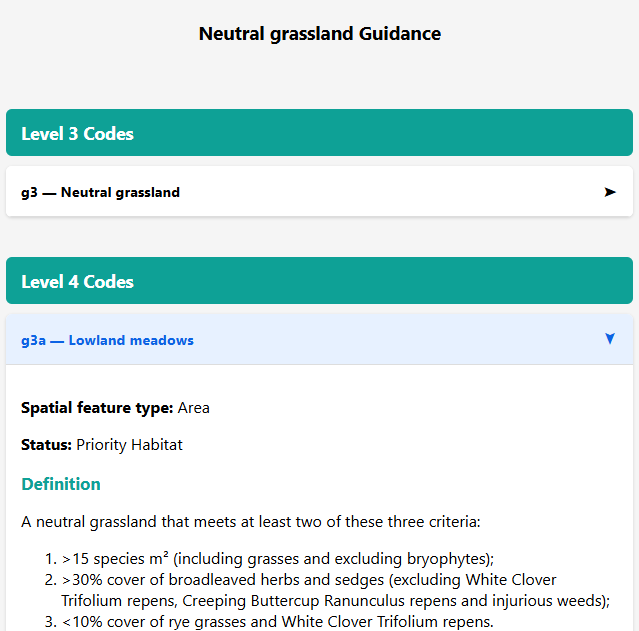
Refer to full UKhab guidance in QGIS in the office, or on Qfield/Mergin in the field
One of the biggest inefficiencies in traditional BNG workflows is the disconnect between field survey and GIS analysis. Data is often recorded in notebooks or separate apps, then manually transferred, reformatted, and checked back in the office.
Spatialsesh BNG removes this disconnect entirely.
Using QGIS, QField & Mergin Maps together
The project is designed to work wherever you do.
In the office, it runs natively in QGIS. In the field, it integrates seamlessly with QField and Mergin Maps, allowing you to capture, edit, and validate data on-site.
Both apps support offline working, reduce transcription errors, and ensure that your data flows directly into your analysis without re-entry. Whether you prefer the simplicity and syncing of Mergin Maps or the advanced digitising tools in QField, Spatialsesh BNG supports both approaches.
Why use UKHab classification in a BNG QGIS workflow?
With full UKHab forms, and habitat descriptions for reference, ecologists can confidently classify habitats either in QGIS or directly in the field.
Crucially, this uses the complete UKHab classification system; far more detailed and ecologically meaningful than the simplified Metric habitat list.
When it comes to analysis, the project automatically converts UKHab entries into the required Metric habitats. There’s no need for manual translation or cross-referencing; everything is handled behind the scenes.
How do you simplify BNG condition assessments?
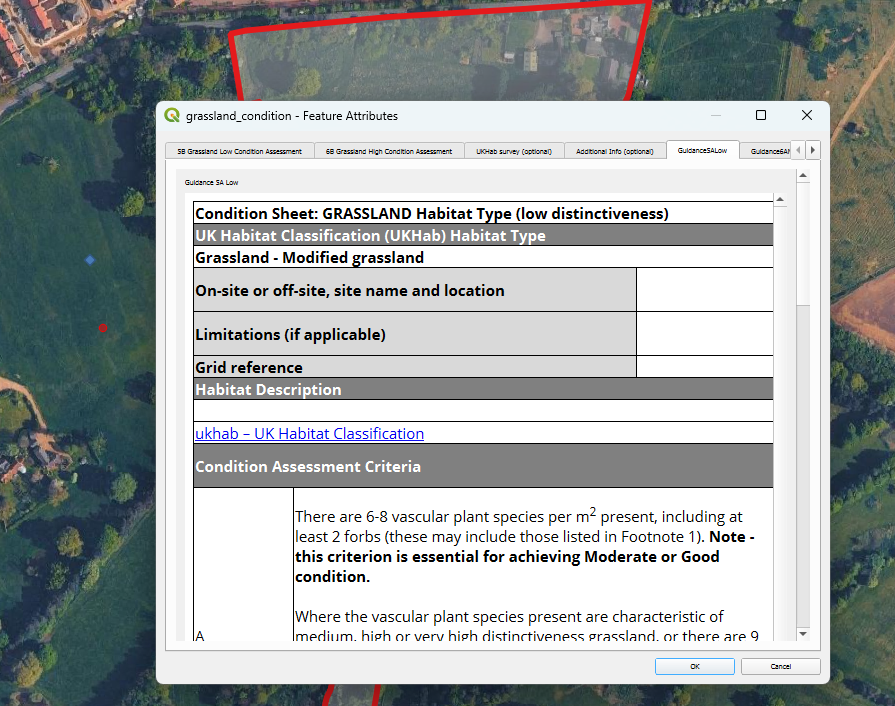
Statutory condition assessment forms, and guidance, built in.
Condition assessments are a mandatory and often time-consuming part of BNG, yet many workflows treat them separately, with guidance stored elsewhere, and outputs requiring manual formatting.
Spatialsesh BNG integrates this process fully.
It includes mandatory condition assessment forms, with official Natural England guidance embedded directly into the interface. Ecologists can reference criteria in the field while completing assessments; reducing uncertainty and improving consistency.
Outputs are structured so they can be copied directly into the statutory metric spreadsheets. No reformatting, no duplication; just clean, ready-to-use data.
The result is a workflow where field data is captured once, correctly, and is immediately ready for BNG assessment.
How do you manage baseline and proposed habitats in BNG mapping?
One of the most common frustrations with the NE template is the way baseline and proposed layers are linked. While intended to streamline workflows, this often creates more problems than it solves; particularly when working with complex or evolving design data.
Spatialsesh BNG takes a different approach.
By separating baseline and proposed layers, it avoids the fiddly digitising issues that arise from linked datasets. Ecologists can map each dataset independently, making it far easier to work with CAD imports, revise designs, or test alternative scenarios.
Design iterations become simple: create a new proposed layer, run the analysis (more on that below), and compare results; no need to duplicate entire projects or untangle linked geometries.
How can you fix geometry issues in BNG mapping quickly?
Perhaps the biggest time drain in any BNG mapping workflow is fixing geometry.
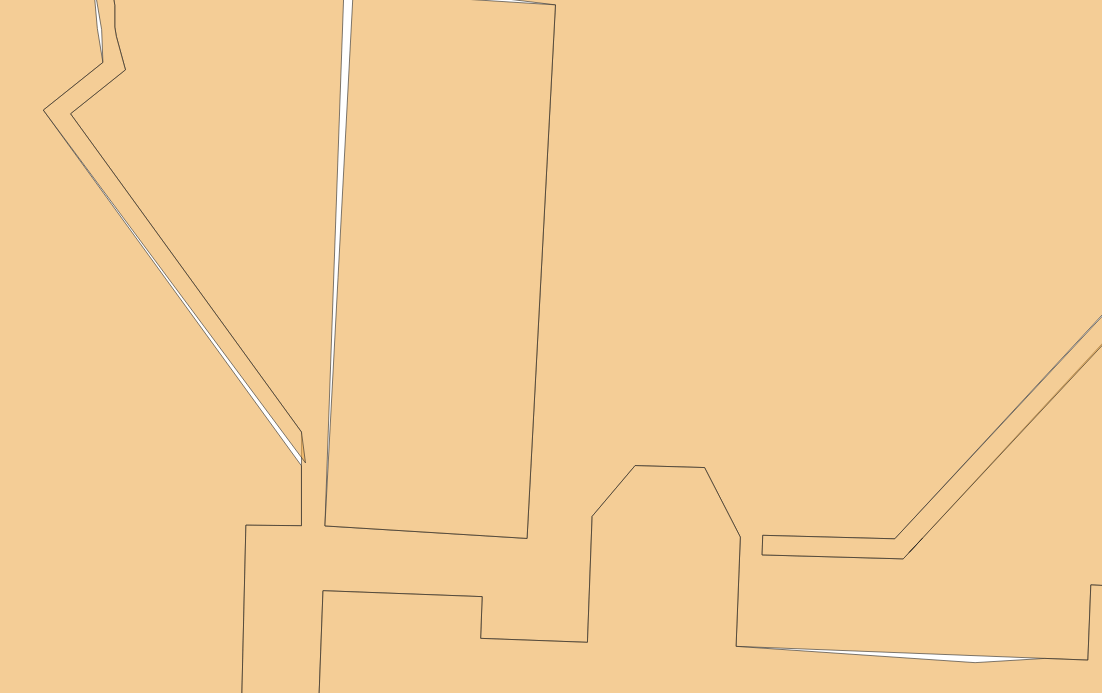
Say goodbye to issues like this with tools to automate fixing of geometry & digitising errors.
Invalid polygons, overlaps, gaps, and duplicate features have been a persistent issue in ecological GIS. Traditionally, fixing these requires a combination of manual editing and multiple processing tools; often taking hours on complex sites.
Spatialsesh BNG replaces this with custom Python-powered tools and QGIS models that automate the entire process.
With a single run, you can:
Clean and validate geometry
Remove overlaps and slivers
Ensure full coverage within the red line boundary
Standardise datasets for analysis
These same tools also integrate baseline and proposed layers, preparing outputs for export to the BNG metric. What was once a frustrating, multi-step process becomes quick, reliable, and repeatable.
A better way to deliver BNG assessments
BNG has raised the bar for ecological data; and rightly so. But the tools we use need to rise to that challenge as well.
Spatialsesh BNG is designed to streamline your BNG mapping workflow in QGIS by reducing friction, eliminating repetitive tasks, and enabling high-quality outputs with confidence.
Less time fixing data.
Less time exchanging data between software.
More time focusing on ecology .
Get started with Spatialsesh BNG
Spatialsesh members are already seeing significant productivity gains using these tools.
If you’d like to explore how it could improve your BNG workflow; or discuss your current challenges; drop me an email.